Deployments & change correlation
OpsPing tracks deployments and releases from GitHub and GitLab and surfaces those that landed just before an incident. Configure provider access, set a lookback window, and map repositories to services so responders see recent changes on alert and incident pages. These native integrations link repository deployments; they do not send alert notifications.
- Admin access. Deployments is a dedicated sidebar destination under Services.
- At least one service to map repositories to, per Incidents & services.
-
Connect GitHub or GitLab
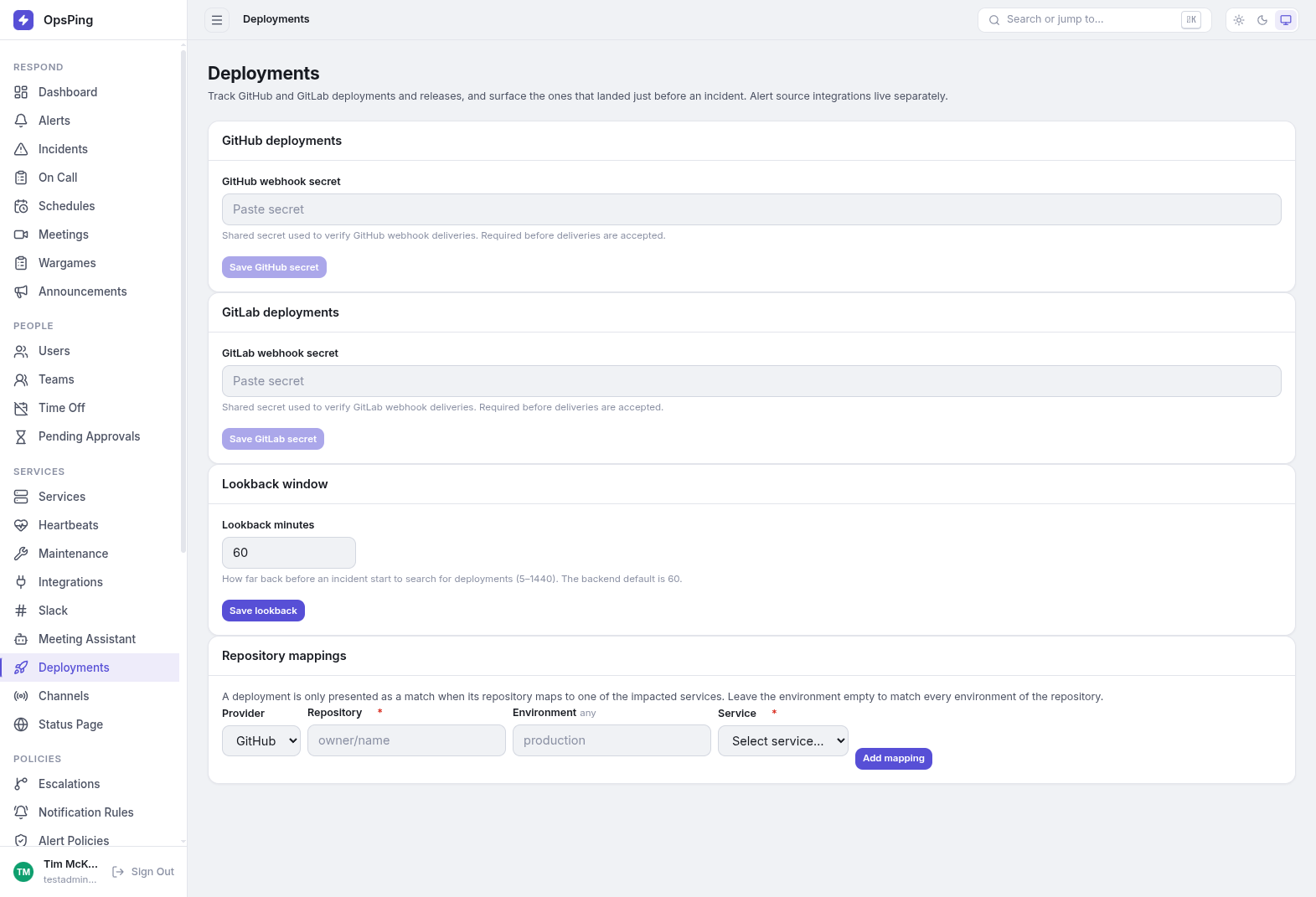
Open Deployments from the sidebar. GitHub and GitLab each have their own card for linking deployment events. Set the webhook secret on the provider card, then configure the provider to send deployment/release events to the read-only Webhook URL shown after saving; deliveries with a different secret are rejected. Map repositories to services so responders see correlated deploys and releases on alert and incident pages. These integrations link deployment events; they do not deliver alert notifications. To send an alert from a CI workflow, use the API from a GitHub Actions job as shown in the inbound integrations guide.
- Secret configured pill — shown on the card once a secret is stored.
- Write-only secrets — the field is blank after saving; enter a new value only to rotate. Leave it blank to keep the current one.
-
Set the lookback window
Lookback minutes controls how far back before an incident start to search for deployments. Allowed range is 5–1440 minutes; the backend default is 60. Save applies tenant-wide.
-
Map repositories to services
A deployment is only presented as a match when its repository maps to one of the impacted services. Add a mapping by choosing the provider (GitHub or GitLab), the repository as
owner/name, an optional environment (leave empty to match every environment of the repository), and the target service. Repository and service are required.Existing mappings are listed in a table with a Delete action. Deleting asks for confirmation: stored events are kept but no longer surface as matches.
-
See matches on alerts and incidents
Alert and incident detail pages show a Recent changes card. Correlation runs on the alert's linked service, or on the union of an incident's impacted services, over the lookback window. If nothing matched, the card says so — "No deployments found in the lookback window (N minutes)." Alert source integrations are configured separately under Integrations: inbound.
NoteGitHub and GitLab native integrations link deployment and release events for correlation. For inbound alerting, post JSON to OpsPing using the API or an inbound webhook integration.